
All support operations occur within the WordPress admin environment to keep your workflow streamlined.
Navigating the Ticket Dashboard
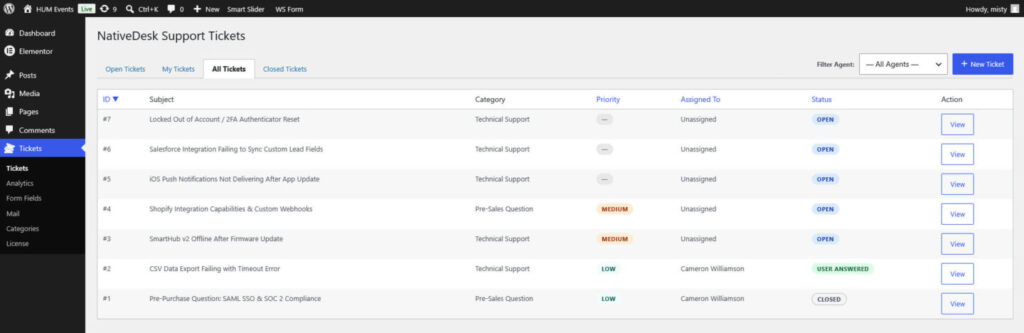
- Go to Tickets in the main WordPress admin sidebar.
- View incoming tickets organized by category, status, submission date, and priority.
- NativeDesk utilizes optimized REST API polling to update your inbox in real time without requiring full page refreshes.
Replying to and Managing Tickets
Clicking on any ticket opens the full communication history and ticket metadata.
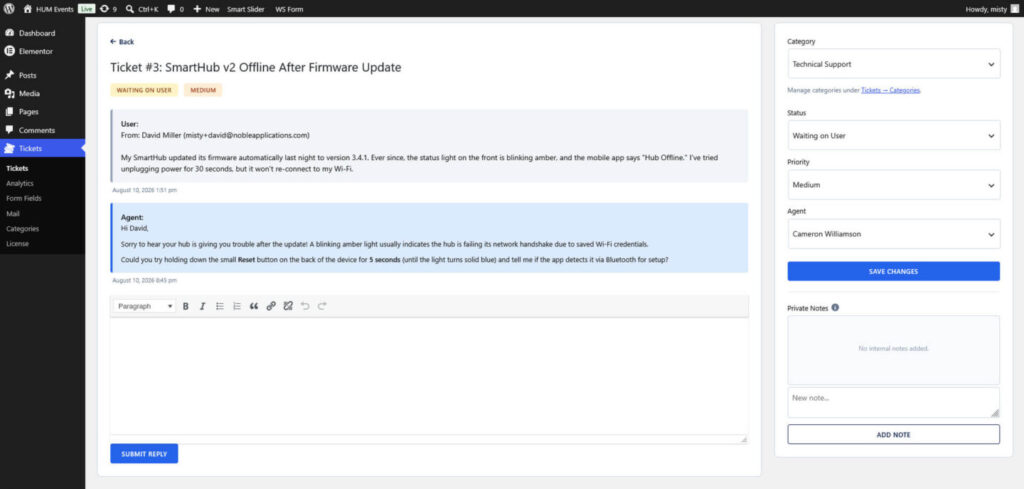
From the ticket view, site staff can:
- Read customer messages and view attachments.
- Post public replies that automatically trigger email notifications to the customer.
- Update the ticket status (Open, Pending, Resolved, Closed).
- Assign or update ticket priorities and categories.